Facebook Pinterest Instagram Bloglovin' Teachers Pay Teachers Image Map
Showing posts with label Apps. Show all posts

5 Apps for Effective Small Group Instruction {with For a Love of Teaching}


Over the past two weeks, the amazing teacher-bloggers here at The Elementary Entourage have shared many incredible ways they manage and monitor effective small group instruction. Let me just tell you, we have some rock star teachers in this group!

I am an Instructional Technology Facilitator, and I'm always looking for new and innovative ways to bring technology into the classroom. Today I'm going to share with you 5 Fast & Effective Apps to Use in Small Group Instruction. Some of these apps are free and some you have to purchase, but all are very effective! You can easily use any of these apps to enhance your small group instructional time.

#1 Stick Pick ($3.99)
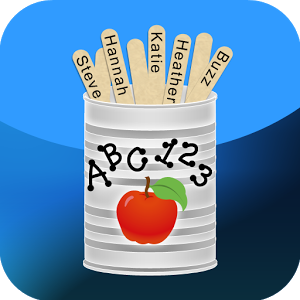

Oh, how I love Stick Pick! This app lets you pick a student at random with a tap, swipe, or a shake, but that's not the best part! Stick Pick is unique because it suggests question starters for learners at different levels and also records how well students respond to the questions and small group discussion. The questions are based on Bloom's Taxonomy, and you can easily change the question level for each student. Stick Pick is also a great app for building and recording formative assessment data on students. It's definitely not your average student picker app!


#2 Popplet ($4.99 - free for the lite version)


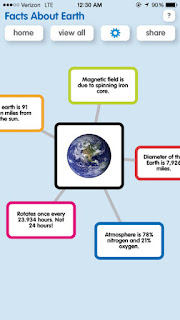
Popplet is getting a lot of buzz in the world of educational technology right now and if you've ever used Popplet then you know why! This is one of the best customizable and interactive graphic organizer apps I've found. It is very simple and engaging to use which makes it the perfect addition to your classroom or any small group setting. Popplet will allow you and your students to capture and organize ideas in a visually appealing way - perfect for your visual learners! Create graphic organizers in a snap, illustrate a story, arrange the main idea with details, compare and contrast stories...the possibilities are limitless!

Popplet Lite is FREE! It offers many of the same options, but you can only work on one popplet at a time. Unless you plan on keeping your popplets stored on the device, the free version works great!

          

#3 Grammar Jammers (Free for Primary Edition - $2.99 for Elementary Edition)


Grammar Jammers is such a fun app full of catchy animated songs and rhymes that make learning exciting! This kid-friendly app teaches a variety of grammar concepts such as parts of speech, punctuation, and capitalization. Each animation unlocks a quiz. If students answer the quiz questions correctly within the Grammar Jammers topics it will unlock an interactive reward. This app is the perfect tool to use in a small group setting to introduce or review new grammar topics. There is also a reset feature that allows teachers to clear the data and reset the game for another group or the next user. 

Grammar Jammers was created by Pearson and is available as a series:
Primary Edition - FREE
Elementary Edition - $2.99
Middle School Edition - $2.99


#4 Learn Sight Words (free)


If you need to practice sight words with your small group of students - then this is the app you need! This app has over 300 flashcards with high-frequency words and easy-to-read print for students. Students can hear each word pronounced clearly or you can opt to turn the sound off. Learn Sight Words is a simple to use app that allows students to swipe through the cards of a 25-word mix. There's also a category for any words you flag to review for later. Students power through all 300+ words with 25 cards at a time. It's the perfect app to quickly review sight words within small groups.


#5 Running Record Calculator (free)


Why not make the most of your small group time and throw in a running record! This fast and accurate app makes testing literacy easy! It combines the standard running record calculator and stopwatch into one convenient app. It even has an audio recording playback option. The easy to use flagging function allows you to quickly refer back to the audio and it automatically counts errors and self-corrections. This running record calculator gives you immediate feedback. You will see the student's scores for words per minute, self-correct ratio, and accuracy percentage.

After you complete a running record with this app, press the email button to send a report of the running record to yourself, administrator, literacy specialist, or parents.


Students need a variety of opportunities to work with different classmates in different ways, and students love using technology! So, don't be afraid to incorporate it into your small group time. Students always surprise me at how much they can do and how quickly they learn how to use a new app or piece of technology. Even if you only have one iPad you can still incorporate many of these apps into your classroom or small group instruction.


Making the Most of Small Group Instruction....Pre K Edition!


Hey Y'all! 
This is Lisa from ALL Y'all Need and I'm going to share a few tips and tricks that I use in my small-group instruction. Pre K small-group instruction looks a little different than any other grade level. Basically, I have 3 rounds of small group a day. After morning greeting and calendar time, I work with half of my class at my table for what I call "Play Planning." Once the kiddos are at my table, they choose a center they would like to go to. My centers include home, sensory, puzzles, light table, iPads, dramatic play, blocks, etc... Once they have chosen a center, they must write a sentence and draw a picture of themselves at the center. Play Planning gives me time to reinforce correct pencil grip, letter formation and one to one correspondence with my kiddos. It's completely differentiation. Some kiddos are tracing the sentence, some are writing the sentence independently, and others are extending the sentence and labeling their picture. Here's what my play plans look like: 


A little while later, I work with my reading small group. With some kiddos, I am focusing on letter identification while other groups are doing Guided Reading. After lunch, I work with my math groups. During those times, we play games to focus on our weekly concept and use our iPads to practice writing our numbers. My Pre K kiddos' absolute favorite writing app is called Doodle Buddy. The kids love being able to change the background picture. It's the little things, people! haha 


Happy Teaching!


100 Days and Counting {with Mrs. Decatur's Little Gators}


I will just preface this post by saying...how on earth has it been 100 days of school already this year?! Having said that... I am totally ready to bust out my special shirt & button! Let the celebration of learning begin! 


Since I only teaching reading and social studies to my two groups of firsties... the 100th day usually sneaks up on me! I don't do calendar time and count the days, when January rolls around, I have to peek next door and ask my lovely partner what day the 100th day will fall on! 


The first thing I do is decorate the door, this banner is hanging on for life y'all... this will be year 4 with it! I am not the first teacher to come up with this idea but the looks on the kids faces when they see it, is just priceless! 


Using this Aging Booth app has to be my all time favorite 100th day project! You simply open the app and take a photo of each student. Then print them out on regular black and white printer paper on your school's copier. 

Students wrote about the things they would like to do when they are 100 years old... too funny. Some of the funniest ones were about drinking coffee, playing cards, napping, and doing puzzles! 

Check the app out by clicking the photo below. 


Students used scrapbook paper for the clothes, dollies, buttons, and cotton balls to bring their 100 year old self to life! This project was well loved by the other staff member & building visitors! So cute. 

Happy 100th Day! 


Parent Communication with Stephany from Primary Possibilities


There are a lot of great apps out right now that serve as tools for teachers to communicate with parents.  They are great because they take you outside of sites like Facebook where you have little control of parents sharing pictures or posting.  The Bloomz app has thought of everything when it comes to communication from the classroom!  It's super easy to use for the teacher.  I can't imagine how much time I will save uploading and sharing, communicating, and scheduling with this app! x


I recently did a review of the Bloomz app which is a great communication tool.    You can read more about it by clicking here.

I also like to keep track of my parent communication with these simple tracking sheets.  This is a great way to keep yourself accountable and also to give yourself some back up in sticky situations.  


How do you track parent communication in your classroom?

What I Love About Teaching: Using Technology in the Classroom


Hi y'all!  It's Stephanie from The Learning Chambers.  I can't wait to share with you guys what I love about teaching.  I LOVE that I'm a teacher in the ever growing technology age!  I mean my school is surrounded by new construction and our internet has been down on a few occasions.  Y'all, the struggle was real!  I was like I can't teach, I don't have this and I can't open that!  It was rough!


Today, I wanted to share some of my technology favorites that can easily be implemented in any elementary classroom.


If you read my blog, you know that I use edmodo daily in my classroom.  I've been using it for four years and for various things.  The one thing that I use it for the most is for math homework.


I create a short video tutorial that the kids watch for homework and then there are questions at the end of the video that they answer for homework.  Most of my kids have a parent with a smart phone or they have a tablet of their own that they do their homework on.  I have a few without access, but they are allowed to do the math homework here at school in the mornings or during our workstation time.

I also use Moby Max, which is an app within edmodo that helps the kids practice math facts and other math skills.  You can  send it to one of your edmodo groups by visiting the app store and searching for the free math apps.  My kids LOVE Moby Max.


I have two different blog posts that I have written about how I use edmodo in my classroom.  You can click on the pictures below to read those blog posts.

http://learningchambers.blogspot.com/2015/01/tech-talk-january-blog-hop.html


My second favorite tech app is Spelling City.  My kiddos love using it to practice their spelling words.  I have a free account and I'm able to add their spelling lists weekly.  They log into our free class account and then they can choose different games to help them practice their spelling words.  So much better than just writing your words 3 times each.  Right?!?!

http://www.spellingcity.com/
My last favorite way to use technology in the classroom is to have students create a presentation after a unit of study or after a research unit.  It's the best way to show off what they learned and something that they can keep forever.  I wanted to share some of my favorite presentation apps and web tools that you can easily use in your classroom.

https://www.haikudeck.com/

Haiku Deck is a slideshow type presentation app for the iPad and it also comes in a web based app as well.  You can click on the picture above to see the web based app.  It's super easy to use and comes with backgrounds and pictures built in that your student can choose from.

http://popplet.com/

I still really love to use popplet with my kiddos.  They can easily put all of their facts in a web and add pictures as well.  You can export their finished popplets as a jpeg image or a pdf.  I love that!


I also just started using Google Drive with my kiddos.  They have been creating slideshow presentations about their famous person research using Slides.  It's super easy to use and I love that they can search for images inside of Slides.  I'm planning on writing a longer post later after their presentations are finished.  Stay tuned!

Thanks so much for reading about how I love to use technology in my classroom.  I would love to write more technology posts and would love for you to follow my blog to read more.

http://learningchambers.blogspot.com